Submitting a demo request
To request a demo please visit http://www.wpci.com/business/customer-care/submit-repair2.asp and fill out the form.
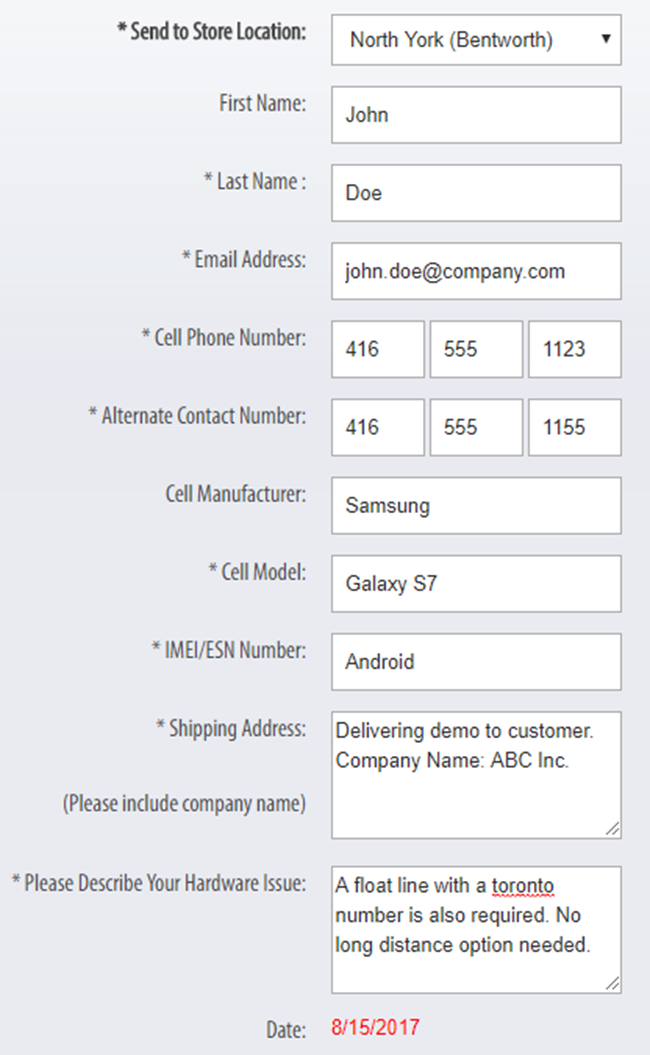
First Name – Enter clients first name
Last Name – Enter clients last name
Email Address – Provide customers email address
Cell Phone Number – Provide customers cell phone number
Alternate Contact Number – Provide customers contact phone number
Cell Manufacturer – Specify which brand the customer is requesting to demo e.g.: Apple, Samsung etc.
Cell Model – Specify the exact model of the device e.g.: iPhone 6s
IMEI/ESN Number – Enter ‘1’
Shipping Address – Provide information on where the demo is being shipped. If being hand delivered, please indicated over here.
Please Describe your Hardware Issue – Include any other details that do not have a place elsewhere. E.g.: if a float line is required.
Checklist before issuing a demo device
- Ensure that the device has been wiped and reset to factory settings
- The device has been fully charged
- Inspect device for damages and phone functionality i.e. Test call