How to check what’s on consignment?
In the Reports tab, select Inventory and choose “Products on Consignment Report”.
Reports>Inventory>Products on Consignment Report

Under Pick Date(s), make sure you change it to everything.
Once the report generates it will show you all the items that are currently under consignment.
How to create a new consignment?
- Go to the Inventory tab.
- Click on the three dots on the top right of the screen.
- Select ‘New Consignment’
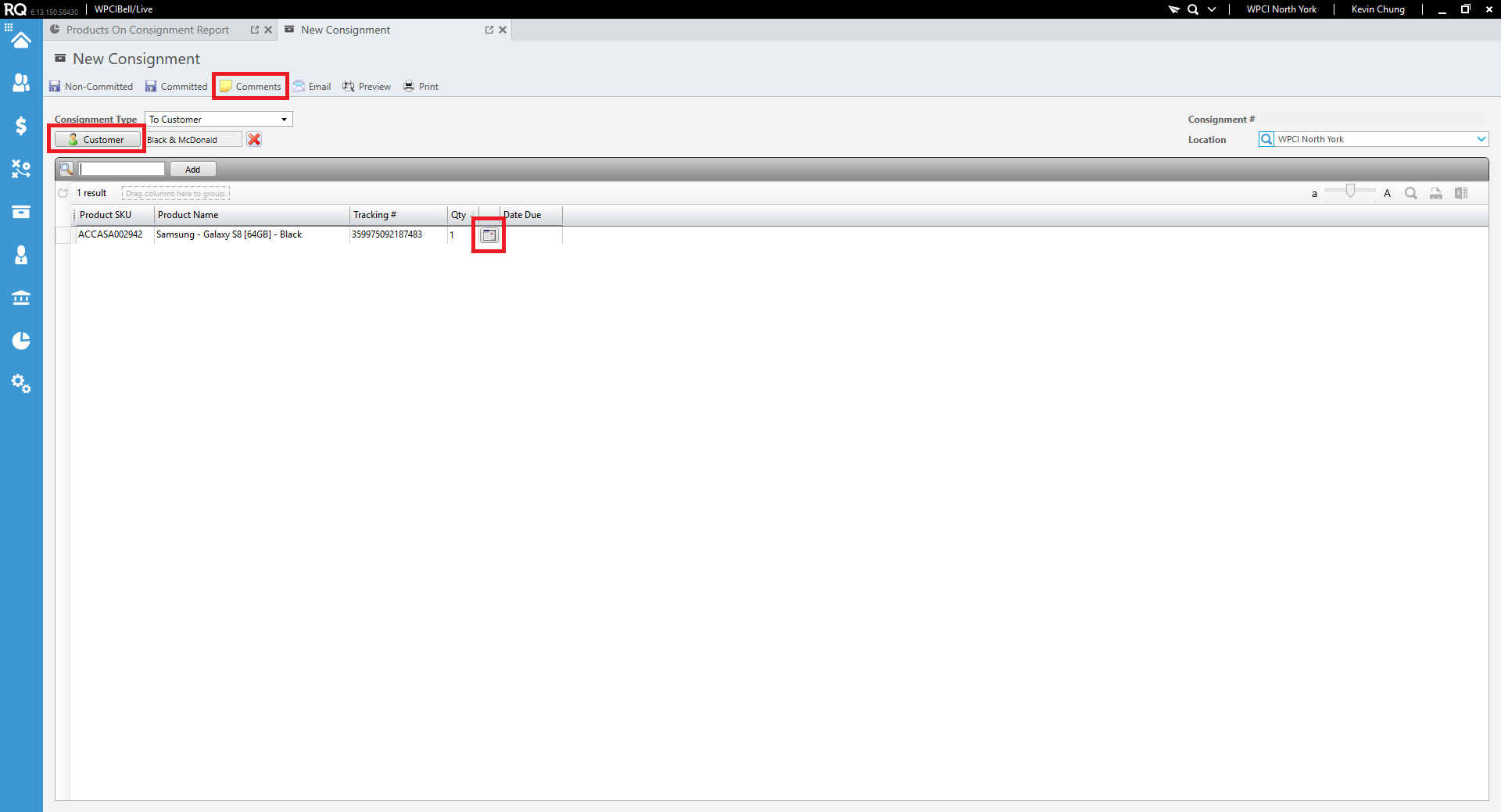
- Click on ‘Customer’. Ensure to always select the Bill To customer in RQ.
- Click on the magnifying glass to start adding SKU’s on the consignment.
- Serialized Inventory will be accompanied with the IMEI#.
- Once the item has been added click on the calendar next to the item to set a due date. Due dates should not exceed more than 90 days.
- To add additional notes in relations to this consignment click on the ‘Comments’ available on the top.
- Once all the items have been added to the Consignment click on ‘Committed’ on the top of the screen.
- This will lock the Consignment. Print 2 copies of the Consignment report to take to shipping.
How to manage Consignment?
Every month when completing the AR reports, Corpserv is responsible for checking what hardware is out on consignment. Any hardware past 45 days needs to be refreshed.
You will need to follow up with the customer daily after sending the initial draft, and escalate to Sonia if the client does not oblige within ten business days (two weeks).
The following draft can be used to send to clients for consignment refresh:
“
Hello {customer name},
The following hardware provided to you as consignment is expiring soon. We require those devices to be returned to us and we can replace them with newer models that will have the most recent firmware and operating system already installed.
| Product Name | Tracking # (IMEI) | Quantity | Consigned On |
| Apple iPhone 8 64gb – Blue | 3535353535353535 | 1 | April 1st 2018 |
| Apple iPhone 8 64gb – Gold | 3535353535545455 | 1 | April 1st 2018 |
| Apple iPhone 8 64gb – Blue | 3535654654564654 | 1 | April 1st 2018 |
Please let us know if a pick up by FedEx or Purolator needs to be arranged, or if you have a delivery service you can use for the return.
Thank you,
{Signature}
”